
01 / FOLLOW YOUR LINEUP
Live TV
Start with the channels you actually watch. Check the lineup for your preferred countries, languages, and categories.
TiviMate Pro · IPTV plans
Explore TiviMate IPTV plans for live TV, movies and series. Choose your subscription duration and device allowance, or request a free 24-hour trial to test playback before ordering.
Need help getting started? Browse device guides ↗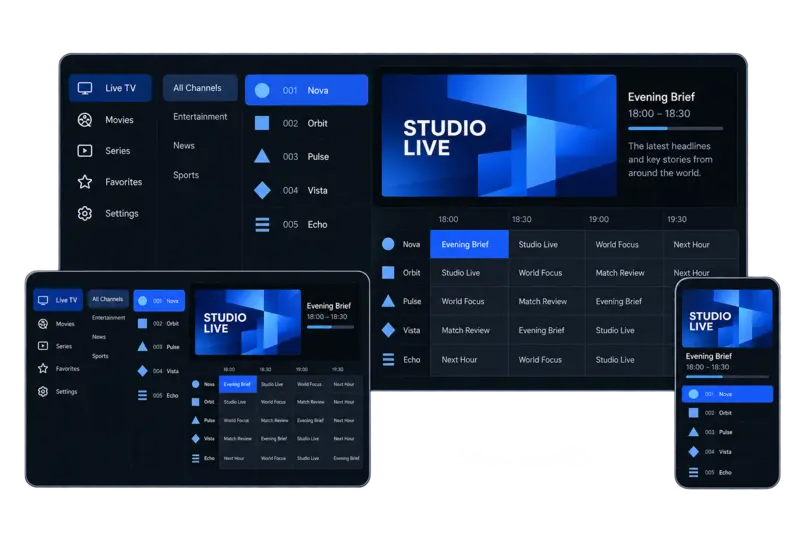
Beyond the numbers
Choosing a TiviMate IPTV subscription starts with what matters to you: the channels you follow, the movies and series you look for, and the way you watch. Explore your options, then use the 24-hour trial to check the experience on your own device.
Start with the channels you actually watch. Check the lineup for your preferred countries, languages, and categories.
Browse on-demand viewing separately from live channels. Looking for a particular title? Check its availability before subscribing.
Use your trial to check picture quality, navigation, and playback on the device and internet connection you’ll use regularly.
Plans that fit your setup
Start with your device count, then choose your subscription length. Choose the duration that suits you—each plan includes the same core features.
1-device plan
USD total · 1 month access
$14.99/device/month
1-device plan
USD total · 3 months access
$10.00/device/month
1-device plan
USD total · 6 months access
$8.33/device/month
1-device plan
USD total · 12 months access
$5.83/device/month
Want to try it before choosing a plan?
Request a 24-hour free trialFrom your plan to your screen
Start your TiviMate IPTV subscription order in three steps: choose a plan, enter your contact details, and receive your order confirmation.
Select your device count and subscription length, review the total price, and click Choose Plan to open checkout with your selection.
Choose the plan that matches your preferred duration and device count.
View Pricing PlansEnter your full name, email address, and phone number with country code. Check your selected plan and total, then click Place Order. No payment is collected at this step.
Use contact details where our team can reach you through WhatsApp or email.
You will reach the thank-you page with your order number, selected plan, and total. Your order is recorded so our team can send a payment link through WhatsApp or email.
Keep your order number. Contact support if you need help with your order.
Compare what matters
Compare your TiviMate IPTV subscription options by channel access, viewing quality, trial terms, and support—not just the headline price.
| What to compare | TiviMate Pro | Other providers |
|---|---|---|
| Live channels | 60,000+ | Check lineup |
| Movies & series | 220,000+ | Check catalog |
| Picture quality | 4K, FHD & HD | Check availability |
| Device plans | 1–4 devices | Check limits |
| TV guide (EPG) | Included | Check coverage |
| Free trial | 24 hours | Check trial terms |
| Live chat support | 24/7 support | Check support hours |
| Setup guidance | Device guides | Check setup help |
Note: Check current plan details when comparing providers. Quality and EPG availability may vary.
Clear answers before you choose
Understand your TiviMate IPTV subscription, from choosing a plan to getting your first playlist running.
It is access to an IPTV service that you add to a compatible player, such as TiviMate. Your subscription supplies the viewing access; the player displays your playlist and available TV guide.
With TiviMate Pro, you choose a subscription length and device plan. See the available plans and total prices before ordering.
The TiviMate player does not supply channels. Installing the app alone does not give you a channel lineup; you need a playlist or subscription from a separate content provider.
If you are considering our service, explore the channel information and check the channels that matter to you before choosing a plan.
Have your activation details ready, open TiviMate, and choose the option to add a playlist. Select the connection type matching the details you received, enter them carefully, and let the player load the playlist and available guide data.
Use our step-by-step setup guide for the full process. Never share your password or private playlist URL publicly.
TiviMate can be used on compatible Fire TV devices. Your Fire TV model, software version, and installation method affect setup, so follow the instructions for your device rather than a guide for a different platform.
Start with our Fire TV Stick installation guide. Check device compatibility before purchasing specifically for that setup.
No. A TiviMate Pro subscription and a TiviMate Premium app upgrade are separate purchases. Our plan provides subscription access; Premium unlocks features within the player.
TiviMate Pro is independent of the app developer. For the player's current features and purchase options, use the official TiviMate website.
First check that your internet connection works and your subscription is active. Recheck your login details and server address for typing errors, then try another channel to see whether the problem affects one stream or your whole playlist.
A playback error does not automatically mean TiviMate is down. If it continues, contact our support team with your device model, player version, error message, and the affected channels. Do not include your password in screenshots.
Place your order with your name, email and phone number. Our team will send a payment link through WhatsApp or email and confirm the available payment methods. No payment is collected when you submit the order.
Choose your duration and device count on the pricing page, then check the full USD total for the selected plan.
After payment is confirmed, your activation details are delivered through WhatsApp or email. Make sure the contact details entered at checkout are correct; if you use email, check your spam or junk folder as well.
Keep your order confirmation and follow the setup instructions. If you need help locating your details, contact support with your order reference.
There is no single speed figure that fits every channel. The required bandwidth depends on the stream's bitrate and resolution, how many devices are streaming, and other activity on your network. Higher-resolution streams generally need more bandwidth, while a stable connection matters at every resolution.
Test on the device and network you will actually use. Ethernet or a strong Wi-Fi signal can help reduce local connection problems. Use the 24-hour free trial to check playback before committing to a longer plan.
A VPN is not a requirement of the TiviMate player itself. Whether it is appropriate for your setup depends on your network, privacy preferences, and the service's connection rules. It can also affect speed or cause a service to reject a connection, so it is not a guaranteed fix for buffering.
If you plan to use a VPN, check with support and test that setup during your trial. A VPN does not change the permissions required to access content.
Try it on your own setup
Explore the channels, check playback on your device, and see how the service fits your viewing habits before choosing a plan.
Ready to choose?
Compare 1, 3, 6, and 12-month plans for your device count. Review the full price and included features, then choose the option that suits your setup.